How to Use ChatGPT to Write Website Copy for a Small Business (With Prompts & Examples)
A practical tutorial for entrepreneurs worldwide.
Creating website content can be challenging when you’re starting a small business. You might know exactly what your business offers but struggle to write an engaging homepage, a professional About page, or clear service descriptions.
That’s where ChatGPT can help.
ChatGPT website copy can give small-business owners a starting point for writing professional, easy-to-understand website content without needing advanced writing skills.
But how good is the content ChatGPT produces? And do you need complicated prompts to get useful results?
At BrandWebLab, we tried two different ChatGPT prompts to generate content for our own website.
In this guide, we’ll share what happened, show you how to write better prompts, and provide practical examples you can use for your business.
What Is ChatGPT Website Copy?
Website copy is the written content visitors see on a website.
It includes:
- Homepage headlines and descriptions.
- About Us information.
- Product and service descriptions.
- Contact page messages.
- Frequently asked questions.
- Calls to action, such as “Contact Us” or “Get Started.”
ChatGPT can help you draft, rewrite, organize, and improve this content.
For example, a small-business owner who struggles to describe their services can provide ChatGPT with business information and ask it to create a clear first draft.
However, AI-generated content should always be reviewed before publishing.
ChatGPT may misunderstand information, make assumptions, or include claims that aren’t true.
Your knowledge of your own business remains essential.
Can ChatGPT Really Write a Business Homepage?
Yes. To explore this, we tested ChatGPT using our website, BrandWebLab.
BrandWebLab publishes beginner-friendly tutorials about WordPress, AI tools, website building, and automation.
Our audience includes small-business owners, entrepreneurs, and people learning how to use digital tools.
We wanted to see how ChatGPT would describe our website using two different instructions.
Test 1: A Simple ChatGPT Prompt
First, we used this short prompt:
“Write homepage content for BrandWebLab.”
We didn’t include a detailed list of sections, a word limit, or specific writing instructions in the prompt itself.
What Did ChatGPT Generate?
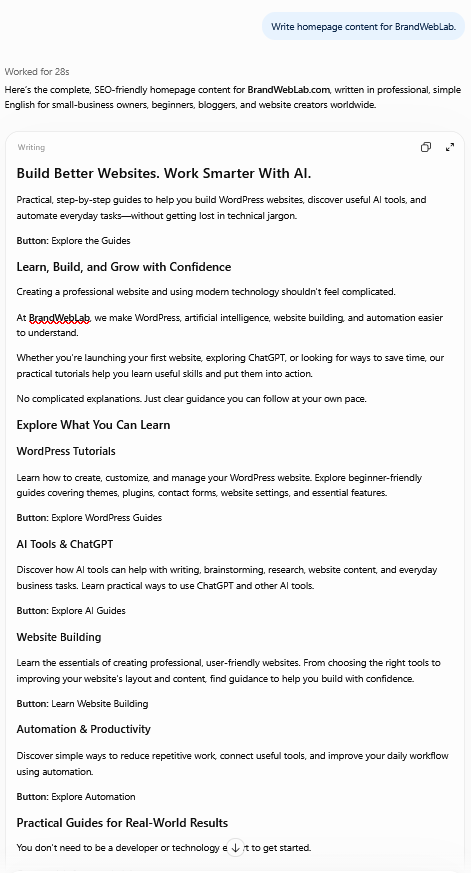
Surprisingly, ChatGPT produced a detailed homepage draft.
It started with this headline:
Build Better Websites. Work Smarter With AI.
The introduction explained that BrandWebLab helps readers learn WordPress, discover AI tools, and explore automation.
The response also included several homepage sections:
- Learn, Build, and Grow with Confidence
- Explore What You Can Learn
- WordPress Tutorials
- AI Tools & ChatGPT
- Website Building
- Automation & Productivity
- Latest Tutorials & Helpful Guides
- Who Is BrandWebLab For?
- Frequently Asked Questions
It even suggested calls to action such as Explore the Guides and Start Learning Today.
Our Opinion About Test 1
The result was better than we expected from such a short prompt.
It included useful homepage sections, matched BrandWebLab’s general topics, and gave us ideas for organizing the website.
However, the output was quite long.
Some benefits were repeated in different sections, and the suggested navigation buttons would still need real destination pages.
We would also need to check that every topic mentioned was supported by content already available on our website.
Overall, Test 1 provided a useful starting point for building a complete homepage.
Important: A short prompt may still produce a detailed response when ChatGPT has relevant context from previous conversations or other available information. We did not isolate that factor in this experiment.
Test 2: A Detailed ChatGPT Prompt
For our second test, we gave ChatGPT more specific instructions.
We explained:
- What BrandWebLab is.
- Who our readers are.
- Which topics we cover.
- What writing style we wanted.
- How long the headline and description should be.
- Which type of call to action we needed.
We also instructed ChatGPT not to invent achievements, customer numbers, paid services, or testimonials.
The Prompt We Used
Act as an experienced website copywriter.
Business: BrandWebLab, an English-language website offering guides about AI tools, automation, WordPress, and website building.
Audience: Small-business owners and beginners worldwide.
Write a homepage hero section containing:
- A headline under 12 words.
- A subheading under 30 words.
- One clear call-to-action button.
Use a professional, friendly tone and simple English.
Focus on practical benefits.
Do not invent business achievements, customer numbers, paid services, or testimonials.
Provide three different versions.
What Did ChatGPT Generate?
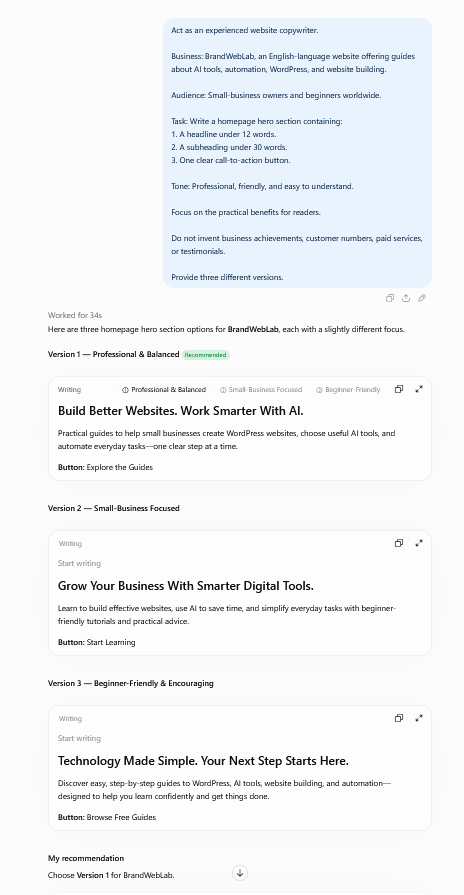
ChatGPT produced three concise homepage hero options.
Our preferred version was:
Headline:
Build Better Websites. Work Smarter With AI.
Subheading:
Practical guides to help small businesses create WordPress websites, choose useful AI tools, and automate everyday tasks—one clear step at a time.
Call-to-action button:
Explore the Guides
This version was short, clear, and aligned with BrandWebLab’s purpose.
It explained our website’s main topics while emphasizing practical benefits for readers.
Test 1 vs Test 2: Which Was Better?
Both prompts produced useful content, but they served different purposes.
| Feature | Simple Prompt | Detailed Prompt |
|---|---|---|
| Homepage headline | Clear and relevant | Clear and relevant |
| Main headline | Same headline | Same headline |
| Content length | Full homepage | Short hero sections |
| Number of options | One main draft | Three versions |
| Format control | Limited | More precise |
| Best use | Generating broad ideas | Creating specific copy |
The most interesting discovery was that both tests produced the same main headline.
The detailed prompt did not automatically create a better headline.
Instead, it gave us greater control over the length, structure, and number of alternatives.
Because the two prompts requested different amounts of content, this was a practical comparison rather than a controlled test of prompt quality.
What We Learned
You don’t always need a long prompt to get useful ideas from ChatGPT.
A simple prompt can be a good starting point.
But when you need a particular format, tone, word count, or audience focus, providing detailed instructions can make the output easier to use.
Our recommendation: Start with a simple request, review the result, and add more specific instructions when you want to improve it.
How to Write Website Content Using ChatGPT: Step by Step
Now let’s apply what we learned to a typical small-business website.
You can follow these steps even if you’ve never used ChatGPT for writing.
Step 1: Prepare Your Business Information
Before opening ChatGPT, write down some basic information about your business.
You should know:
- Your business name.
- What you sell or provide.
- Who your customers are.
- What problems you help customers solve.
- What makes your business different.
- What you want visitors to do on your website.
For example:
Business: ABC Home Cleaning
Services: Residential cleaning services
Audience: Busy homeowners and working professionals
Main benefit: Convenient cleaning services that help customers save time
Desired action: Request a cleaning quote
These are fictional example details. When creating real website copy, replace them with accurate information about your own business.
Step 2: Ask ChatGPT to Write Your Homepage
Your homepage should quickly explain your business and give visitors a clear next step.
You can use this reusable prompt.
Homepage Copy Prompt
Copy and customize:
Act as a professional website copywriter.
My business name is [Business Name].
We provide [Products or Services].
Our ideal customers are [Target Audience].
We help them solve [Main Problem].
Our main benefit is [Real Customer Benefit].
Write a homepage hero section with:
- One headline under 12 words.
- One description under 30 words.
- One clear call-to-action button.
Use friendly, professional language.
Avoid complicated words and exaggerated promises.
Provide three different versions.
After receiving the response, compare the versions and select the one that best describes your business.
You can also ask ChatGPT to combine useful parts from different versions.
Step 3: Use ChatGPT to Write Your About Us Page
An About page introduces your business and helps visitors understand who you are.
A useful About page should explain:
- What your business does.
- Why it exists.
- Who it helps.
- What customers can expect.
- How visitors can get in touch.
About Us Prompt
Act as an experienced small-business copywriter.
Write an About Us page for my business.
Business name: [Name]
What we do: [Description]
Who we help: [Customers]
Why we started: [Real Story]
Our values: [Values]
Write approximately 300–400 words.
Use a friendly, trustworthy tone and short paragraphs.
Include a welcoming introduction, business information, and a closing call to action.
Do not invent awards, years of experience, team members, testimonials, or business achievements.
Important Tip
Review any personal or business history included in the output.
If ChatGPT invents a founding story or describes experience you don’t have, remove that information.
An honest About page is more valuable than an impressive-sounding but inaccurate one.
Step 4: Create Service Descriptions
If your business provides multiple services, ChatGPT can help you explain each one clearly.
For example, a web design business might offer:
- Website design.
- WordPress setup.
- Website maintenance.
- Landing page creation.
Each service should have a description explaining what customers receive and why it is useful.
Service Description Prompt
Act as a website copywriter for a small business.
Business type: [Business Type]
Service: [Service Name]
Target customers: [Audience]
What the service includes: [Actual Deliverables]
Main benefits: [Real Benefits]
Write:
- A clear service headline.
- A short introduction.
- Four key benefits.
- A simple explanation of how the service works.
- A call to action.
Use easy-to-understand English.
Do not invent prices, guarantees, certifications, or turnaround times.
How to Improve the Result
If the output sounds too promotional, ask:
“Rewrite this in simpler language. Remove exaggerated claims and explain the service more clearly.”
This can help produce writing that feels more natural and useful.
Step 5: Create Better Call-to-Action Buttons
A call to action tells visitors what to do next.
Examples include:
- Contact Us
- Request a Quote
- View Our Services
- Explore the Guides
- Start Learning
- Book a Consultation
The best choice depends on your business.
For BrandWebLab, Explore the Guides is appropriate because our current goal is to help readers find tutorials.
For a service business, Request a Quote might make more sense.
CTA Prompt
Generate 10 call-to-action button ideas for my website.
Business: [Business Name]
Audience: [Target Customers]
Desired action: [Contact Us / Buy a Product / Read Articles / Book a Service]
Keep each button under five words.
Use professional, friendly language.
Avoid misleading urgency and unrealistic promises.
Recommend the three clearest options.
Choose a CTA that matches a real action visitors can take.
Don’t use “Book Now” if your website doesn’t actually offer booking.
Step 6: Use ChatGPT to Improve SEO Titles and Meta Descriptions
ChatGPT can help brainstorm search-friendly page titles and descriptions.
For example, a business owner might need an SEO title for their homepage or a description for a service page.
SEO Writing Prompt
Act as an SEO-aware website copywriter.
My page is about: [Page Topic]
Target audience: [Audience]
Main search phrase: [Keyword]
Generate:
- Five SEO title options.
- Three meta descriptions of approximately 140–155 characters.
- One short URL slug suggestion.
Use natural English.
Make the titles descriptive and relevant.
Avoid keyword stuffing and unsupported claims.
Important SEO Advice
ChatGPT can suggest wording, but it cannot guarantee that a page will rank on Google.
Before choosing a keyword, research whether people actually search for that topic and what type of content they expect.
When using WordPress, you can enter your chosen SEO title and description into a plugin such as Rank Math.
Step 7: Improve the First Draft
One of the easiest ways to get more value from ChatGPT is to ask it to revise its own writing.
You can use follow-up prompts such as:
- “Make this sound more natural.”
- “Shorten the introduction.”
- “Use simpler English.”
- “Remove repeated ideas.”
- “Make the headline more specific.”
- “Explain how this benefits customers.”
- “Give me three alternative versions.”
- “Remove claims that aren’t supported by the information I provided.”
You don’t need to restart the entire writing process.
Review the result after each revision and keep only the improvements that make the content clearer.
Step 8: Review Everything Before Publishing
Never assume AI-generated text is automatically correct.
Before publishing website content, check:
- Accuracy: Is every statement about the business true?
- Clarity: Can beginners understand the writing?
- Relevance: Does the content address the right audience?
- Originality: Have you added real business information and useful details?
- Tone: Does the writing sound appropriate for your business?
- Calls to action: Do buttons lead to real, relevant pages?
- Repetition: Are the same ideas repeated unnecessarily?
- Privacy: Have you avoided sharing confidential customer or business information?
Pay special attention to statistics, prices, guarantees, testimonials, and claims about products or services.
ChatGPT may produce convincing sentences that still require factual verification.
Step 9: Add the Content to Your WordPress Website
Once the draft is accurate and ready, you can publish it.
For a WordPress website:
- Sign in to your WordPress Dashboard.
- Go to Pages → All Pages.
- Open the page you want to edit.
- Replace or update the relevant text.
- Use heading and paragraph blocks to organize your content.
- Add working links and call-to-action buttons.
- Preview the page on desktop and mobile.
- Save or publish your changes.
After publishing, open the public page to confirm that everything looks correct.
If you’re also creating a contact page, see our related tutorial:
How to Create a Free Contact Form in WordPress Using Kadence Blocks.
Common Mistakes to Avoid
1. Using ChatGPT Without Providing Accurate Business Details
ChatGPT may make assumptions when information is missing.
Provide enough context and correct anything inaccurate.
2. Copying Everything Without Editing
A first draft is rarely perfect.
Remove repeated phrases, check facts, and adjust the tone before publishing.
3. Adding Too Many Marketing Claims
Avoid phrases that promise results you cannot guarantee.
Clear descriptions are usually more helpful than exaggerated statements.
4. Ignoring Your Actual Customers
The website should answer your visitors’ questions and address their needs.
Think about what customers want to understand before contacting or buying from your business.
5. Focusing Only on SEO
Search visibility matters, but useful and trustworthy information matters too.
Write for real people first.
Frequently Asked Questions
Can ChatGPT Write My Entire Website?
ChatGPT can help draft many parts of a website, including the homepage, About page, service pages, and FAQs.
However, the business owner should provide accurate information and review the content before publishing.
Is ChatGPT Website Copy Good for SEO?
It can help create clear titles, organize information, and improve writing.
But using ChatGPT does not automatically improve search rankings. Content quality, relevance, originality, competition, and technical SEO also matter.
Is ChatGPT Suitable for Beginners?
Yes. You can begin with a simple request and add details as you learn.
You don’t need programming knowledge to ask ChatGPT for writing assistance.
Can ChatGPT Write Content for WordPress?
Yes. You can draft content in ChatGPT, review it, and paste the final version into WordPress pages or posts.
Are Longer Prompts Always Better?
No.
In our BrandWebLab experiment, the short prompt produced a useful, detailed homepage.
The longer prompt helped us control the format and receive multiple concise options.
The best prompt depends on what you’re trying to accomplish.
Should I Publish ChatGPT Content Without Changes?
We recommend reviewing and editing it first.
Add accurate details about your business, remove unsupported statements, and make sure the copy meets your visitors’ needs.
Final Thoughts
ChatGPT can be a useful assistant for small-business website writing.
Our BrandWebLab experiment showed that both simple and detailed prompts can produce useful results.
A short prompt can help you brainstorm ideas or create an initial draft.
A detailed prompt can help you request a specific structure, writing style, audience focus, or length.
Neither approach removes the need for human review.
The best website copy combines AI assistance with real business knowledge, careful editing, and an understanding of your customers.
Start with one small section of your website, improve the draft, and build from there.
At BrandWebLab, we share practical tutorials about AI tools, WordPress, website building, and automation to help beginners develop useful digital skills.
For additional reading, see OpenAI’s official ChatGPT prompting guide and Google’s helpful content guidance.
One Comment
Comments are closed.